Hourly to Salary Chart: $10 to $100 an Hour in Yearly Pay (2026)

Featured Hourly to salary chart
Hourly-to-salary-chart

If you want to know what an hourly wage adds up to over a year, this hourly to salary chart gives you the answer in seconds. Find your hourly rate in the left column and read across to see your weekly, monthly and yearly pay. It covers every rate from $10 to $100 an hour, plus part-time hours, overtime and a salary-to-hourly table.

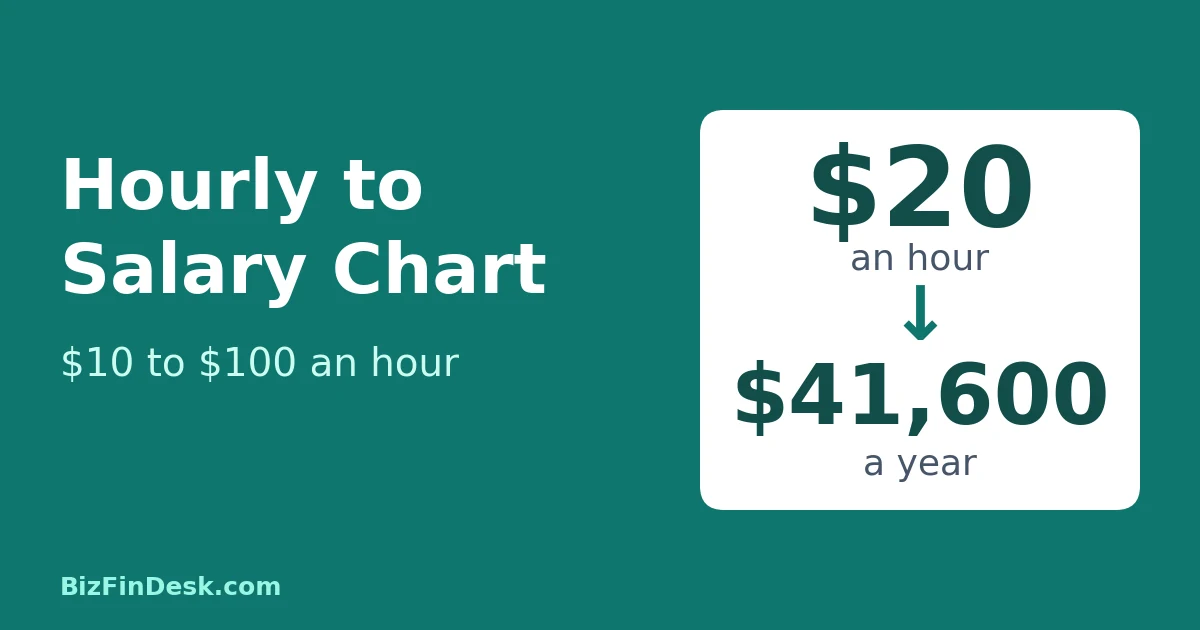
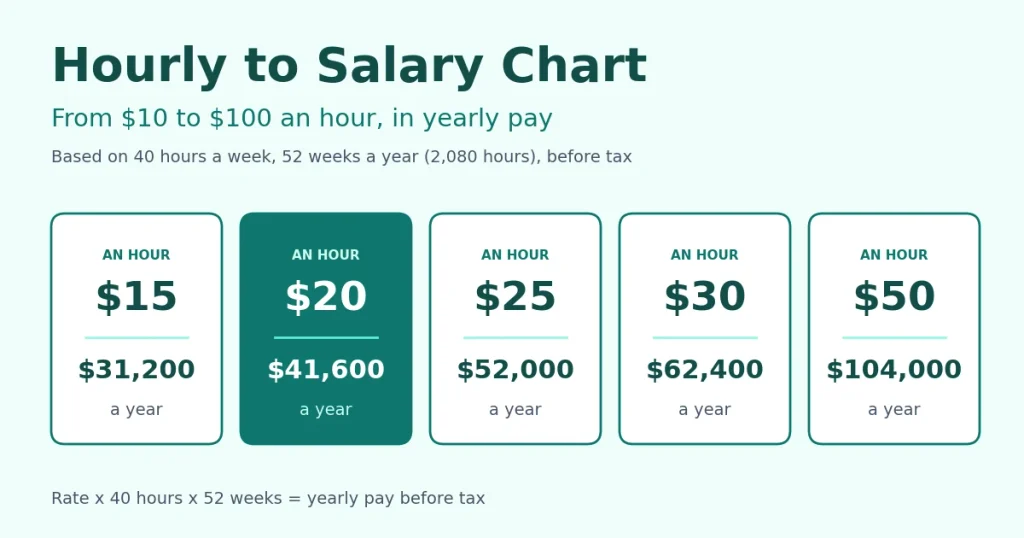
The quick answer: multiply your hourly rate by 2,080 to get your yearly pay before tax. That number is 40 hours a week for 52 weeks. For example, $20 an hour is $20 × 2,080 = $41,600 a year.

Key takeaways

  • Yearly pay = hourly rate × hours per week × weeks per year. For a full-time job that is hourly rate × 2,080.
  • Weekly pay = hourly rate × 40. Monthly pay = yearly pay ÷ 12.
  • Every figure in this hourly to salary chart is before tax.
  • Unpaid time off, overtime and part-time hours all change the result, and the tables below show how.

Hourly to Salary Chart: $10 to $100 an Hour

The figures below assume 40 hours a week for 52 weeks a year, which is 2,080 hours, and they are rounded to the nearest dollar.

Hourly rateWeeklyEvery two weeksMonthlyYearly
$10$400$800$1,733$20,800
$12$480$960$2,080$24,960
$14$560$1,120$2,427$29,120
$15$600$1,200$2,600$31,200
$16$640$1,280$2,773$33,280
$17$680$1,360$2,947$35,360
$18$720$1,440$3,120$37,440
$19$760$1,520$3,293$39,520
$20$800$1,600$3,467$41,600
$22$880$1,760$3,813$45,760
$25$1,000$2,000$4,333$52,000
$28$1,120$2,240$4,853$58,240
$30$1,200$2,400$5,200$62,400
$32$1,280$2,560$5,547$66,560
$35$1,400$2,800$6,067$72,800
$38$1,520$3,040$6,587$79,040
$40$1,600$3,200$6,933$83,200
$45$1,800$3,600$7,800$93,600
$50$2,000$4,000$8,667$104,000
$55$2,200$4,400$9,533$114,400
$60$2,400$4,800$10,400$124,800
$70$2,800$5,600$12,133$145,600
$75$3,000$6,000$13,000$156,000
$80$3,200$6,400$13,867$166,400
$90$3,600$7,200$15,600$187,200
$100$4,000$8,000$17,333$208,000
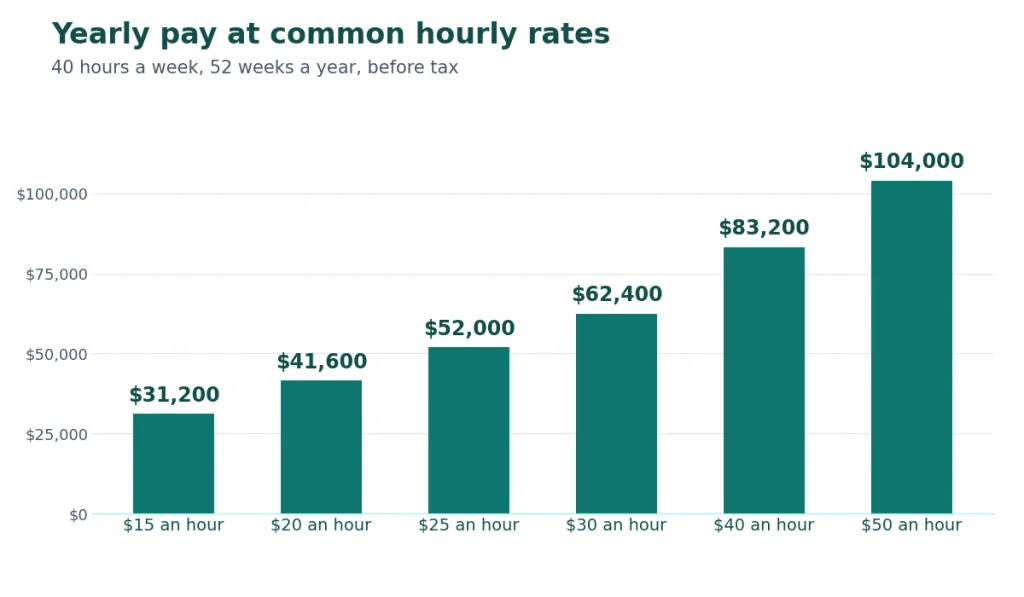
Bar chart of yearly pay at $15, $20, $25, $30, $40 and $50 an hour for a 40-hour week

The maths works in any currency. If you are paid in pounds, euros or rupees, multiply your hourly rate by 2,080 in the same way.

How to Use This Hourly to Salary Chart

  1. Find your hourly rate in the left column.
  2. Read across to your weekly, monthly and yearly pay.
  3. If your rate is not listed, multiply it by 2,080. For $23.50 an hour, that is $23.50 × 2,080 = $48,880 a year.
  4. If you work different hours, use this formula instead: hourly rate × hours per week × weeks per year.

For any rate, any number of hours and any currency, use the hourly to salary calculator. It also works in reverse, from salary to hourly.

Quick Answers for Popular Rates

$15 an hour is how much a year?

$15 an hour is $31,200 a year before tax. That is $600 a week and $2,600 a month.

$20 an hour is how much a year?

$20 an hour is $41,600 a year before tax. That is $800 a week and about $3,467 a month.

$25 an hour is how much a year?

$25 an hour is $52,000 a year before tax. That is $1,000 a week and about $4,333 a month.

$30 an hour is how much a year?

$30 an hour is $62,400 a year before tax. That is $1,200 a week and $5,200 a month.

$40 an hour is how much a year?

$40 an hour is $83,200 a year before tax. That is $1,600 a week and about $6,933 a month.

$50 an hour is how much a year?

$50 an hour is $104,000 a year before tax. That is $2,000 a week and about $8,667 a month.

Hourly to Salary Chart for Part-Time Work

If you work fewer than 40 hours, yearly pay falls in proportion. This version of the hourly to salary chart assumes 52 weeks a year.

Hourly rate20 hours a week30 hours a week40 hours a week
$15$15,600$23,400$31,200
$20$20,800$31,200$41,600
$25$26,000$39,000$52,000
$30$31,200$46,800$62,400
$40$41,600$62,400$83,200

The formula is hourly rate × hours per week × 52.

Salary to Hourly: The Chart in Reverse

The same hourly to salary chart works backwards. To turn a yearly salary into an hourly rate, divide it by 2,080. For a $75,000 salary, that is $75,000 ÷ 2,080 = $36.06 an hour.

Yearly salaryHourlyWeeklyMonthly
$30,000$14.42$577$2,500
$35,000$16.83$673$2,917
$40,000$19.23$769$3,333
$45,000$21.63$865$3,750
$50,000$24.04$962$4,167
$60,000$28.85$1,154$5,000
$70,000$33.65$1,346$5,833
$75,000$36.06$1,442$6,250
$80,000$38.46$1,538$6,667
$90,000$43.27$1,731$7,500
$100,000$48.08$1,923$8,333
$120,000$57.69$2,308$10,000
$150,000$72.12$2,885$12,500

What Changes the Numbers

The chart is a good starting point, but real pay depends on four things.

Unpaid time off. If you are not paid for some weeks, yearly pay is lower.

Hourly rate52 weeks50 weeks48 weeks
$15$31,200$30,000$28,800
$20$41,600$40,000$38,400
$25$52,000$50,000$48,000
$30$62,400$60,000$57,600

Overtime. In the US, covered non-exempt employees must generally be paid at least one and a half times their regular rate for hours over 40 in a week, according to the US Department of Labor’s overtime rules. At $20 an hour, a 45-hour week pays 40 × $20 + 5 × $30 = $950, which is $49,400 over 52 weeks. Rules differ for exempt salaried staff and in other countries.

Tax. Every figure in this chart is before tax. Your take-home pay depends on where you live, your filing status and your deductions. In the US, the IRS Tax Withholding Estimator helps you check how much tax is taken from a paycheck.

Benefits. Health cover, paid leave and employer pension contributions are not part of the hourly rate. When you compare two jobs, compare total pay and benefits, not just the hourly number.

Hourly vs Salary: Which Pays Better?

Neither is better by default. Hourly pay rewards every extra hour you work, and in many jobs it includes overtime. A salary gives you steady income, but many salaried roles do not pay extra for longer hours. To compare an hourly offer with a salary offer, convert both to the same basis with the chart above, then add benefits and unpaid time off.

If you are self-employed, do not use an hourly to salary chart to set your rate. An employee’s hourly pay does not cover your tax, expenses, holidays or unbilled time. The freelance rate calculator works out the rate you need, and our guide on how to price a freelance project explains how to turn it into a quote. When the work is done, the free invoice generator helps you bill the client.

FAQ

How do I read an hourly to salary chart? Find your hourly rate in the first column, then read across the row to your weekly, monthly and yearly pay.

How do you convert an hourly wage to a yearly salary? Multiply the hourly rate by the hours you work each week, then by the weeks you work each year. For a full-time job, multiply it by 2,080.

Why is the number 2,080? It is 40 hours a week multiplied by 52 weeks a year.

How many working hours are in a month? About 173, which is 2,080 hours divided by 12 months.

Is the yearly pay before or after tax? Before tax. Take-home pay is lower and depends on your tax situation.

Does the chart include overtime? No. Add overtime hours separately, usually at one and a half times your regular rate.

$20 an hour is how much a year? $41,600 before tax, if you work 40 hours a week for 52 weeks.

Conclusion

You now have a complete hourly to salary chart: from $10 to $100 an hour, for full-time and part-time hours, and in reverse from salary to hourly pay. For a rate or schedule that is not in the tables, use the hourly to salary calculator and pick your own currency.

This article is general information, not tax or financial advice. Pay rules differ by country and by job.

About the author: [add author name and a two-line bio here]

How Discounts Affect Profit: Do They Hurt Your Margin?

How dicounts affect profit

Last updated 6 November 2026 · 9 min read

How Discounts Affect Profit

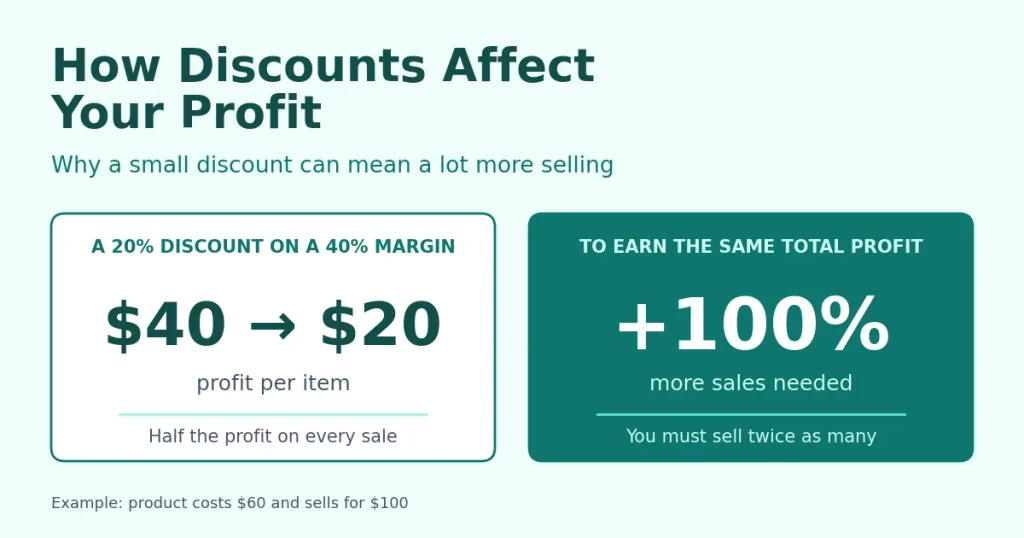
Yes, discounts can hurt your profit, and usually by more than sellers expect. Here is how discounts affect profit: a discount comes straight out of the money you keep on each sale, so you have to sell far more units just to earn what you earned before. On a product with a 40% margin, a 20% discount means you must sell twice as many to make the same total profit.

The good news is that the maths is simple. Once you can do it, you can decide which discounts are worth giving and which ones quietly cost you money. This guide gives you the formula, a table for different margins, a worked example and some smarter alternatives.

The short answer: a discount hurts your profit whenever the extra sales it brings in are smaller than the extra sales you need. The extra sales you need equal the discount divided by your margin minus the discount. A discount that is as big as your margin, or bigger, can never pay for itself.

Key takeaways

  • Understanding how discounts affect profit starts with your margin: the thinner it is, the more dangerous each discount becomes.
  • Extra sales needed = discount ÷ (margin − discount), with both measured as a share of the original price.
  • Revenue can rise while profit stays flat or falls, so judge a promotion by profit, not by sales.
  • Set your largest discount from the extra sales you can realistically win, using the formula in the section on setting a limit.

How Discounts Affect Profit: The Basic Maths

Your costs do not fall when you cut the price. Say an item costs you $60 and sells for $100. You keep $40 on each sale, which is a 40% margin. Take 20% off and the item sells for $80, but it still costs you $60, so you now keep $20 on each sale. The discount did not take 20% of your profit. It took half of it.

That is why you have to sell more just to stand still. At $40 of profit per item, selling 100 items earns $4,000. At $20 per item, you need to sell 200 items to earn the same $4,000.

The formula is:

Extra sales needed = discount ÷ (margin − discount)

Use decimals, with the margin measured on the original price. With a 40% margin (0.40) and a 20% discount (0.20), that is 0.20 ÷ (0.40 − 0.20) = 1.0, which means 100% more sales.

If you are not sure of your margin, the profit margin calculator works it out from your cost and price. If you think in markup instead, the markup vs margin calculator converts one to the other.

The formula assumes that your cost per item and your fixed costs stay the same, and that the discount brings no extra costs of its own. In real life, extra sales often bring extra packaging, shipping, support and advertising costs, so the true hurdle is a little higher.

How Discounts Affect Profit at Different Margins

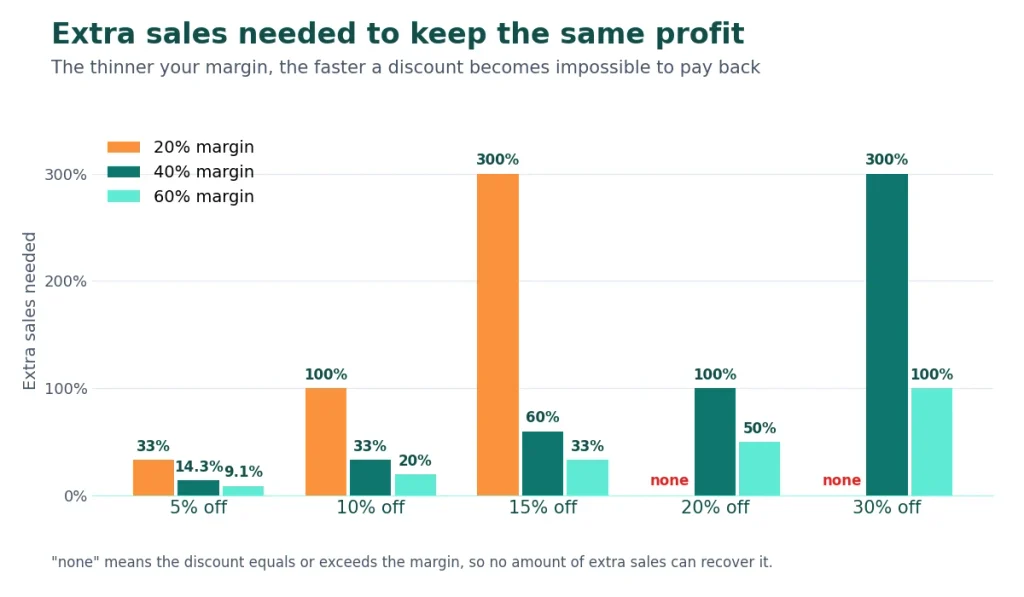
This table shows the extra sales you need to earn the same total profit.

Your margin5% off10% off15% off20% off30% off
20%33.3%100%300%not possiblenot possible
40%14.3%33.3%60%100%300%
60%9.1%20%33.3%50%100%
Chart of extra sales needed to keep the same profit for 5% to 30% discounts at 20%, 40% and 60% margins

Three things stand out:

  • Thin margins are the most exposed. A seller with a 20% margin needs to double sales after only 10% off.
  • A discount equal to your margin leaves no profit. At 20% off a product with a 20% margin, you earn nothing on each sale, and no amount of volume can fix that.
  • Small discounts are cheaper than they look, but they are not free. Even 5% off needs a third more sales at a 20% margin.

A Worked Example: Revenue Up, Profit Flat

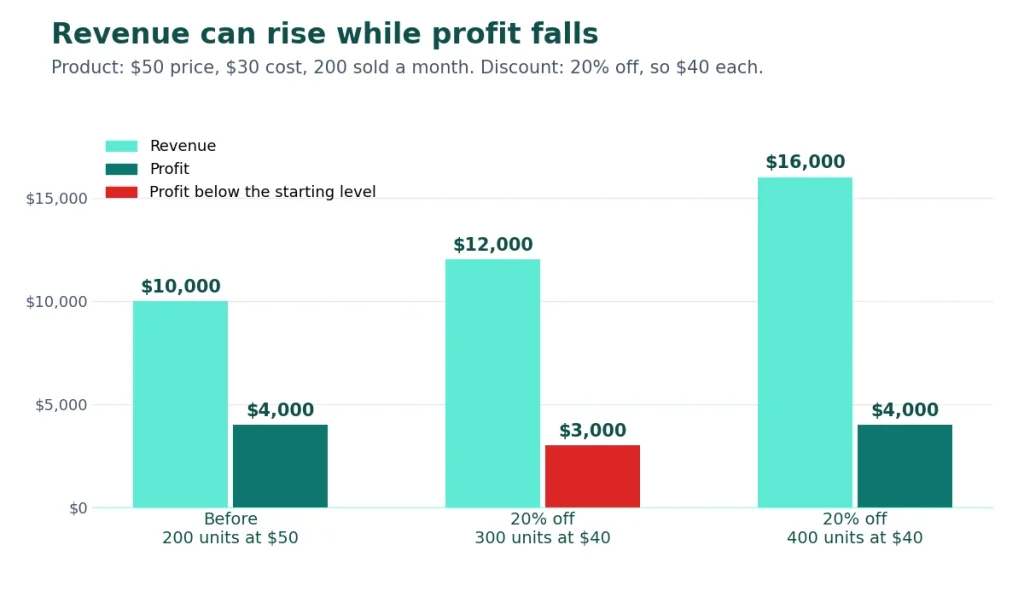
An online shop sells a product for $50 that costs $30. That is a 40% margin, or $20 of profit per item. It sells 200 a month, so revenue is $10,000 and profit is $4,000.

The owner runs a 20% off promotion. The price falls to $40 and profit per item falls to $10. Here is what different results look like:

Units sold at $40RevenueProfit
200 (no extra sales)$8,000$2,000
300 (+50%)$12,000$3,000
400 (+100%)$16,000$4,000
Bar chart: with 20% off, 300 units give $12,000 revenue but $3,000 profit; 400 units match $4,000

At 300 units, revenue is 20% higher than before, so the owner may feel the promotion worked. But profit is down by a quarter. The shop has to double its sales to get back to $4,000, and by then it is handling twice the stock and shipping for the same profit. This example shows how discounts affect profit even when revenue grows, which is why you should judge a promotion by profit and not by sales.

To test your own numbers, enter the price, the discount and your cost into the discount calculator. It shows your profit per item after the discount and the extra sales you need.

What research says about how discounts affect profit

Pricing research from McKinsey, which is widely quoted, found that price is a stronger profit lever than volume. IndustryWeek’s summary of the work says a 1% improvement in price raised operating profit by about 11% on average, if demand held steady. In the same research, as quoted in Karrass’s note on it, a 1% drop in price lowered operating profit by roughly 8%, and price cuts were rarely repaid by extra volume.

Those are averages for large companies, so treat them as a direction and not a forecast for your shop. The lesson holds at any size: a small change in price moves profit far more than it appears.

When a Discount Makes Sense

A discount is not always a mistake. It can pay off when:

  • You are clearing old or seasonal stock. The money is already spent, and cash back beats unsold shelves.
  • You are winning first-time customers who will buy again. Check your repeat-purchase rate before you assume they will.
  • A bigger order brings your cost per unit down. Volume deals can work when the order is much larger.
  • You are filling spare capacity. For a service business, an unbooked hour earns nothing, so a short offer can be better than empty time, as long as it does not set a lower price in the client’s mind.
  • The promotion is short and has a clear end date. A limited offer pulls sales forward without teaching customers to wait for the next sale.

Smarter Alternatives to Discounting

Because you now know how discounts affect profit, it is worth asking whether a discount is the right tool. These options often cost you less:

  • Add value instead. A bonus item that costs you less than the discount would have.
  • Bundle products. Raise the average order value without cutting each price.
  • Offer free shipping above a spending level. Customers add items to reach it.
  • Reward loyalty. Give an offer only after a second or third purchase.
  • Target the offer. Give it to new customers or to people who left items in their basket, not to everyone.
  • Keep discounts rare. If your prices are always on sale, the sale price becomes the real price.

How to Set a Discount Limit

Now that you know how discounts affect profit, you can work backwards and set a limit before you run a promotion.

  1. Find your margin on each product.
  2. Estimate the extra sales you can realistically win. Look at past promotions, not hopes.
  3. Work out the largest discount that still breaks even with this formula:

Maximum discount = margin × lift ÷ (1 + lift)

Here “lift” is the extra sales you expect, as a decimal. For a 40% margin:

Extra sales you expectLargest discount that breaks even
+10%3.6%
+25%8.0%
+50%13.3%
+100%20.0%
  1. Go lower than the break-even figure, because the break-even discount only gets you back to the same profit, not ahead of it.
  2. Compare profit before and after, not just revenue.
  3. Check your fixed costs. The break-even calculator shows how many sales you need each month to cover them, which tells you how much room a promotion has.

One more point on tax: work out margins on prices without VAT or sales tax. If your prices include tax, take it out first with the VATcalculator.

Common Mistakes

  • Judging a promotion by revenue instead of profit.
  • Discounting everything, including your best sellers that would have sold anyway.
  • Giving a discount equal to or larger than your margin.
  • Forgetting the extra costs of shipping, packaging and support.
  • Running sales so often that customers stop paying full price.

FAQ

Can you explain how discounts affect profit in one sentence? Because your costs stay the same, a discount cuts the profit on every sale, so you must sell more to keep your total profit where it was.

Do discounts always hurt profit? No. They can pay off if the extra sales exceed the extra sales you need, or if they clear stock that would otherwise earn nothing.

How many extra sales do I need after a 10% discount? It depends on your margin. At a 40% margin you need 33.3% more sales, at 20% you need 100% more, and at 60% you need 20% more.

What if my discount is bigger than my margin? You lose money on every sale, and no amount of volume fixes that. The only exception is a deliberate loss-leader where you can show the extra profit it brings elsewhere.

Does the same maths apply to services? Yes. Your time is your stock, so a discount cuts what each hour earns. If you sell services, see our guide on how to price a freelance project.

How do I calculate profit after a discount? Subtract your cost from the sale price. The discount calculator does this for you and also shows your new margin.

Conclusion

Now you know how discounts affect profit: they take money from every sale, so the extra sales needed grow much faster than the discount itself. Check your margin, run the numbers before you promote, and prefer offers that add value to ones that just cut the price. To test a specific discount, use the discount calculator.

About the author: [add author name and a two-line bio here]
How to Price a Freelance Project: Hourly, Day Rate or Fixed Price

How to price a freelance project

Quoting a freelance project is the moment many freelancers feel least sure of themselves. Price too high and the client walks away. Price too low and you spend weeks on work that pays less than a part-time job. The good news is that pricing a project is a calculation first and a negotiation second, and you can do it in a few steps.

The short answer: Here is how to price a freelance project in brief: work out your minimum hourly rate, estimate the hours the project needs, add a buffer for revisions and surprises, then choose how to charge. Use hourly pricing when the scope is unclear, a day rate for time-boxed work, and a fixed price when the deliverables are clear. Before you send the quote, check that the price still works if the project takes longer than planned.

Key takeaways

  • Your minimum rate comes from the income you want, your expenses, tax and the hours you can really bill. It does not come from dividing a salary by 2,080.
  • To price a freelance project well, estimate the hours, add a buffer and check the effective hourly rate.
  • Hourly pricing suits unclear scope, a fixed price suits clear scope, and a day rate suits time-boxed work.
  • A fixed price is estimated hours × your rate + a contingency. Then check what it pays per hour if the job runs over.
  • Protect the price with a written scope, a deposit and a rule for changes.

Step 1: How to Price a Freelance Project: Start With Your Minimum Rate

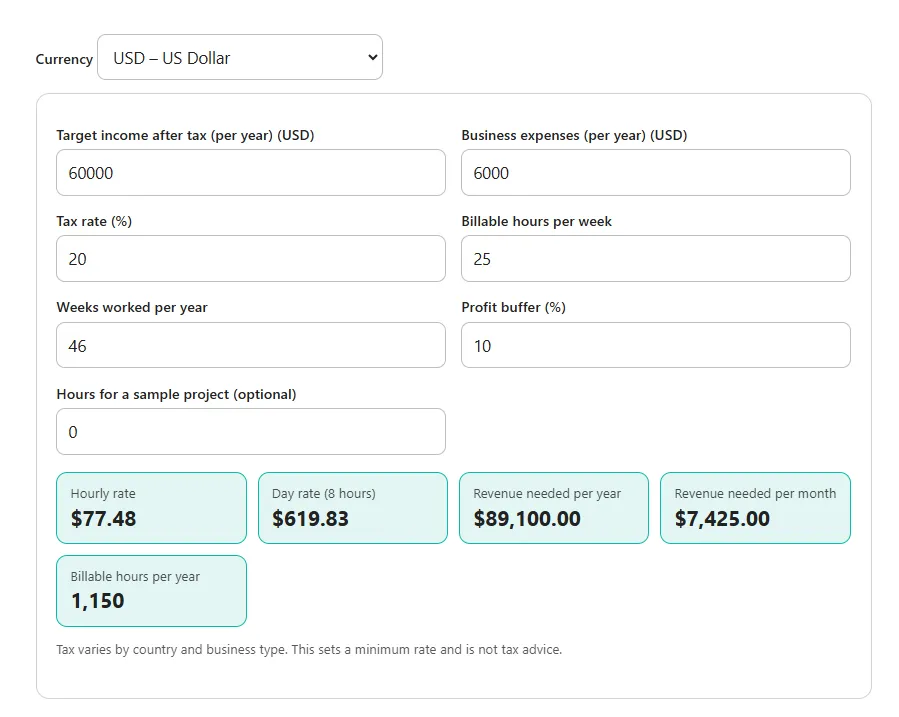
Every pricing model rests on one number: the lowest hourly rate that still gives you the income you want. The freelance rate calculator works it out from your target income after tax, your yearly expenses, your tax rate and the hours you can realistically bill.

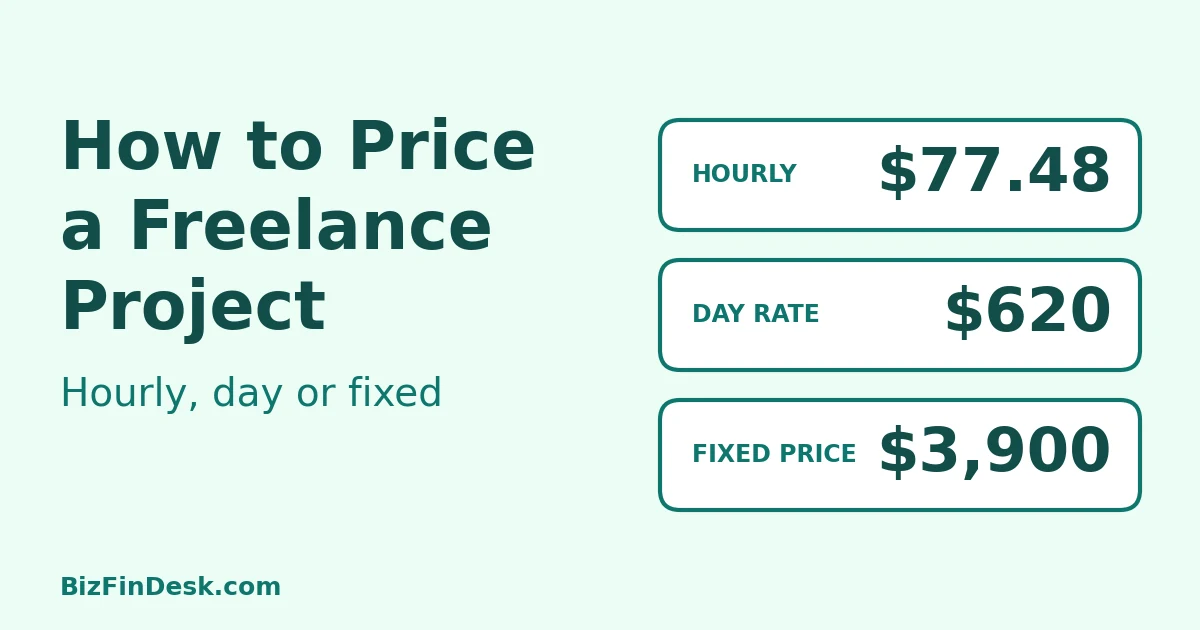
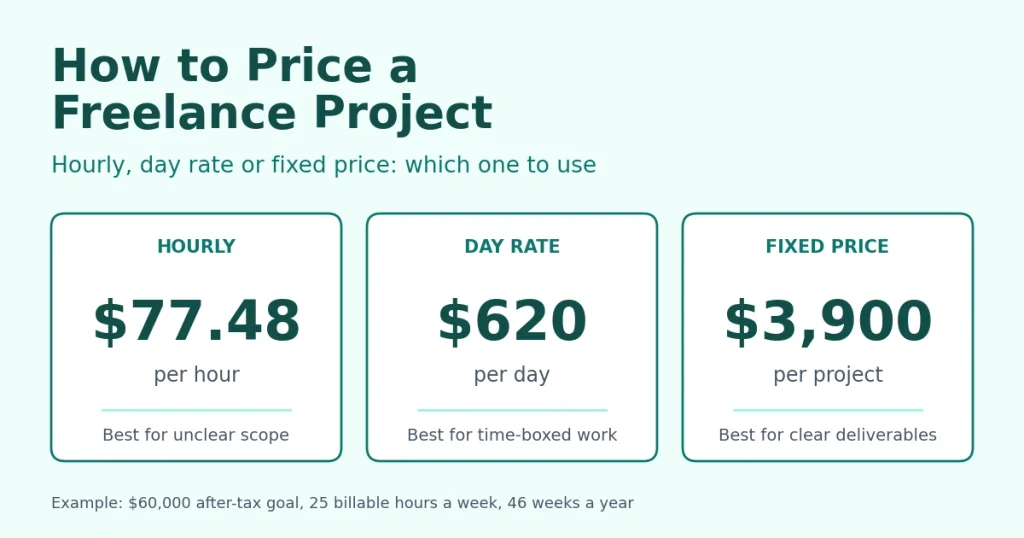
Here is an example. You want to keep $60,000 a year after tax, you expect $6,000 of business expenses and a 20% tax rate, and you can bill 25 hours a week for 46 weeks. With a 10% profit buffer, the minimum rate is $77.48 an hour, or about $620 a day.

Why not take a salary and divide it by 2,080 hours? Because an employee is paid for holidays, sick days and admin time, and a freelancer is not. If you want to see how an hourly rate compares with a yearly salary, use the hourly to salary calculator, but set your rate with the method above.

The four main ways to price a freelance project

ModelBest forMain risk
HourlyUnclear or changing scope, support workThe client cannot predict the total, and faster work earns less
Day rateTime-boxed or on-site work, workshopsDays drift, and half days are easy to dispute
Fixed priceClear deliverables and scopeYou carry the risk of a bad estimate and scope creep
Value-basedWork with a measurable business resultNeeds proof and a good conversation with the client

Hourly pricing

You charge for the time you work. It is flexible, and you are paid for every hour including extra requests. It is the safest choice when the client is not sure what they want. The downsides are that the client cannot predict the final bill, and that you earn less when you get faster. You also need to track your time and be ready to show it. FreeAgent’s beginner guide to pricing projects sets out the pros and cons of hourly and fixed pricing from an accounting point of view.

Day rate

A day rate is your hourly rate multiplied by eight. In the example above that is about $620. It works well when a client wants to book your time for set days, such as a workshop, an on-site visit or a short sprint. A five-day project at $620 comes to $3,100. Agree in advance what counts as a day, and whether a half day is half the price.

Fixed price

When you work out how to price a freelance project with a fixed fee, start from your hours. With a fixed price you sell a deliverable, not hours. The client knows the cost up front, and you keep the benefit when you work quickly. In return you take on the risk of underestimating. Devlin Peck’s comparison of hourly and project pricing makes the case for selling the result instead of your time.

Value-based pricing

Here the price follows the outcome for the client, not your hours. A landing page that is expected to bring in leads worth many times its build cost can justify a price well above your time. It works best when the result can be measured and the client can see the link between what they pay and what they get. Assembly’s beginner guide to value-based pricing explains how it works, and Entrepreneur’s piece on when value-based pricing backfires covers the downsides. Always treat your minimum-rate price as the floor.

Hybrid options

You do not have to pick one model for everything. Common combinations are:

  • A fixed price paid in milestones
  • Hourly with a cap, so the client knows the most they will pay
  • A monthly retainer for ongoing work
  • A fixed price for the agreed scope and your hourly rate for anything extra

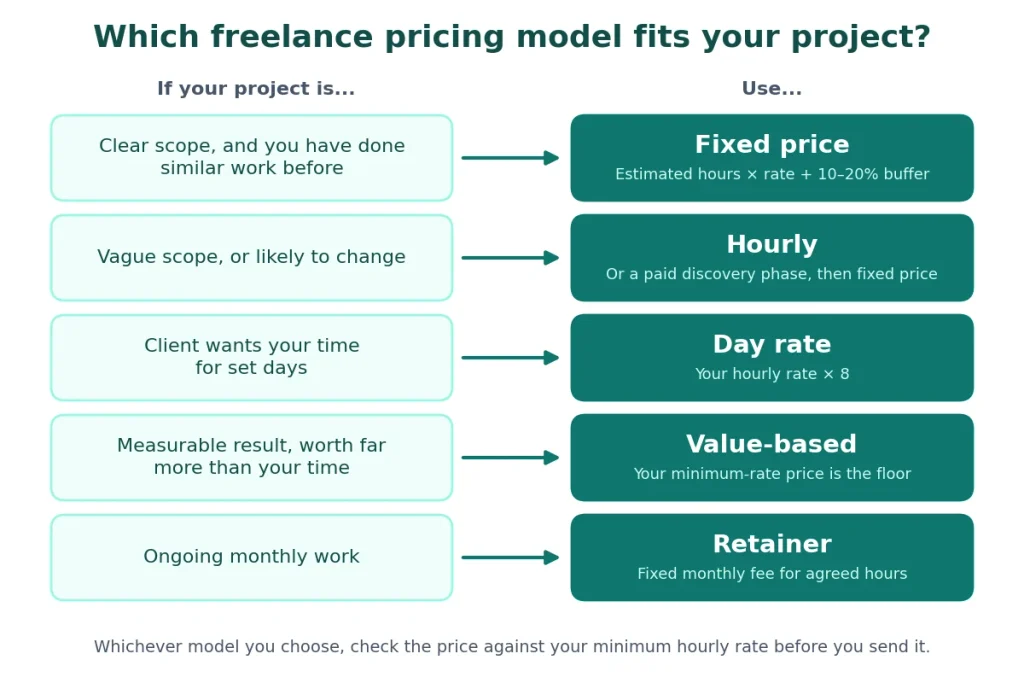
How to Price a Freelance Project: Which Model Should You Use?

  • The scope is clear and you have done similar work: fixed price.
  • The scope is vague or likely to change: hourly, or a paid discovery phase first and then a fixed price.
  • The client wants your time for set days: day rate.
  • The result is measurable and large compared with your time: value-based, with your cost-based price as the floor.
  • Ongoing monthly work: a retainer.
Freelance Pricing Model fits your project

How to Price a Freelance Project in Six Steps

Let’s price a five-page website for a small business, using the $77.48 minimum rate from Step 1.

1. List the deliverables and what is not included. Five pages, a contact form, two rounds of revisions. Not included: copywriting, photography and hosting.

2. Break the work into tasks and estimate the hours.

TaskHours
Kickoff and discovery4
Wireframes and design10
Development16
Client revisions (two rounds)6
Testing and launch4
Project management and communication4
Total44

3. Multiply by your rate. 44 hours × $77.48 is about $3,409.

4. Add a contingency. Most projects run over in some way. Adding 15% brings the price to about $3,920.

5. Round to a clean quote. Quote $3,900.

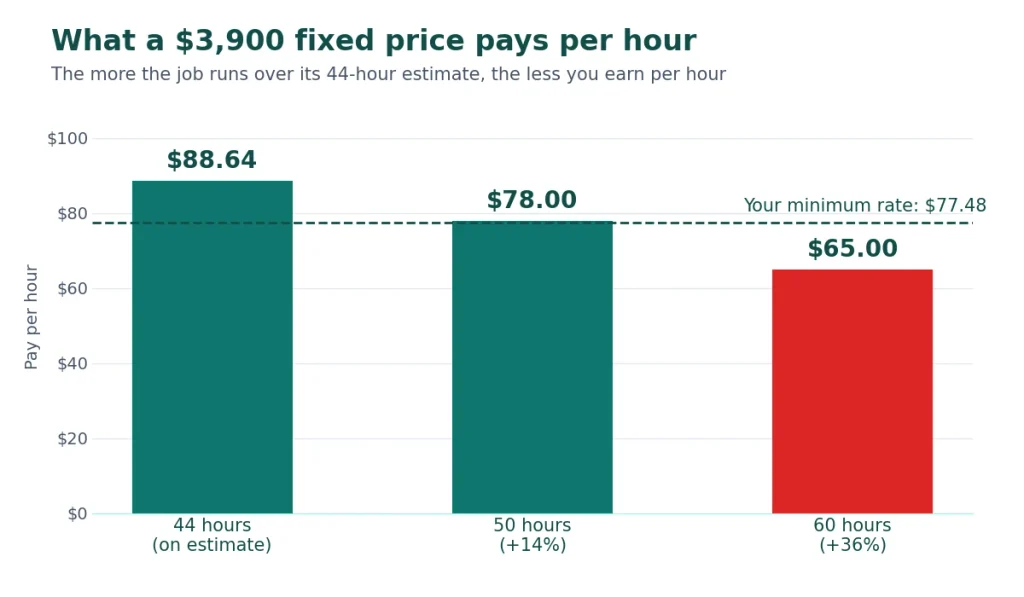
6. Check the effective hourly rate. Divide the price by the hours the job actually takes:

Actual hoursWhat $3,900 pays per hour
44$88.64
50$78.00
60$65.00

The price stays above your $77.48 minimum up to about 50 hours, which is roughly 14% over your estimate. Beyond that you are working for less than you need. This is why scope control matters as much as the estimate.

Effective Hourly Rate

Two more checks help. If you hire a subcontractor for part of the work, the profit margin calculator shows what you keep after paying them. If you resell something, such as hosting or stock photos, the markup vs margin calculator helps you set the price so you earn the margin you want.

Protect your price: scope, deposits and change orders

A good price can still be ruined by a vague agreement. Four habits protect it:

  • Write the scope down. List the deliverables, the number of revision rounds, what is excluded, and what you need from the client and by when.
  • Take a deposit and use milestones. Asking for part of the fee before you start is common, often a third to a half. Tie the rest to milestones, for example 40% on signing, 30% when the design is approved and 30% at launch.
  • Use change orders. Anything outside the scope is quoted separately, at your hourly rate, before you start it.
  • Put an expiry date on the quote. Your costs and availability change.

If the client asks for a discount, cut the scope, not your rate. A 10% discount on $3,900 is $390, which is about five hours of your time at $77.48. The discount calculator shows what a discount does to your profit.

Present the price so it gets accepted

  • Lead with the deliverables and the result, not the hours.
  • Offer two or three packages, such as basic, standard and premium, so the choice is about scope and not about whether to hire you.
  • Explain the price in a sentence or two and do not apologise for it.
  • Know your floor. The break-even calculator shows how many projects or billable hours you need each month to cover your costs, which helps you decide when to say no.

Tax, VAT and invoicing: settle these before you send a quote

Your price has to cover your tax. In the US, self-employed people generally pay tax in instalments through the year, and the IRS’s Self-Employed Individuals Tax Center is the place to start. In the UK, sole traders register for Self Assessment, and GOV.UK explains how to set up as a sole trader. Elsewhere, check with your local tax authority.

State clearly whether your quote includes or excludes VAT or sales tax. The VAT calculator adds or removes tax from a price in seconds.

When the work is done, or a milestone is reached, send a clear invoice with a due date and your payment details. The free invoice generator lets you add your logo and company details and save the result as a PDF.

This article is general information, not tax or financial advice. Rules differ by country, so check with a qualified adviser.

Common pricing mistakes

  1. Copying a competitor’s price, which ignores your own costs.
  2. Setting your rate from a salary instead of your real billable hours.
  3. Forgetting meetings, revisions and admin when you estimate.
  4. Quoting with no contingency.
  5. Giving a fixed price with no written scope.
  6. Lowering the price instead of the scope.
  7. Never raising your rates. Review them at least once a year, and whenever you are fully booked.

FAQ

how to price a freelance project for the first time? Work out your minimum hourly rate, estimate the hours for each task, multiply them, add 10 to 20% for contingency, and check what the price pays per hour if the project runs longer than planned.

Is it better to charge hourly or per project? Neither is better in every case. Hourly suits unclear scope. A per-project price suits clear deliverables that you can estimate well. Many freelancers use both: a fixed price for the build and an hourly rate for later changes.

How do I calculate a day rate? Multiply your minimum hourly rate by eight. In the example above, $77.48 × 8 is about $620. The freelance rate calculator shows the day rate for you.

What should I do if the client has a fixed budget? Ask for it, then agree a scope that fits. Reduce the deliverables, the revision rounds or the speed, not your rate.

How do I handle scope creep? Put the scope and the revision limit in writing, and quote any extra work separately before you start it.

Should I show my hourly rate on a fixed-price quote? Usually not. Show the deliverables and the total price, and keep the hourly rate for change orders and extra work.

Should my quote include VAT or sales tax? It depends on your country and whether you are registered. Say clearly whether your prices include or exclude tax, and check the rules with your tax authority.

Conclusion

You now know how to price a freelance project from your rate to the final quote is built from an honest estimate, and is protected by a clear scope. Work out your minimum rate with the freelance rate calculator, then use the six steps above for your next quote.

About the author:Nasir Khan

Margin vs Markup: What’s the Difference and Why It Matters for Your Pricing

Margin Vs Markup

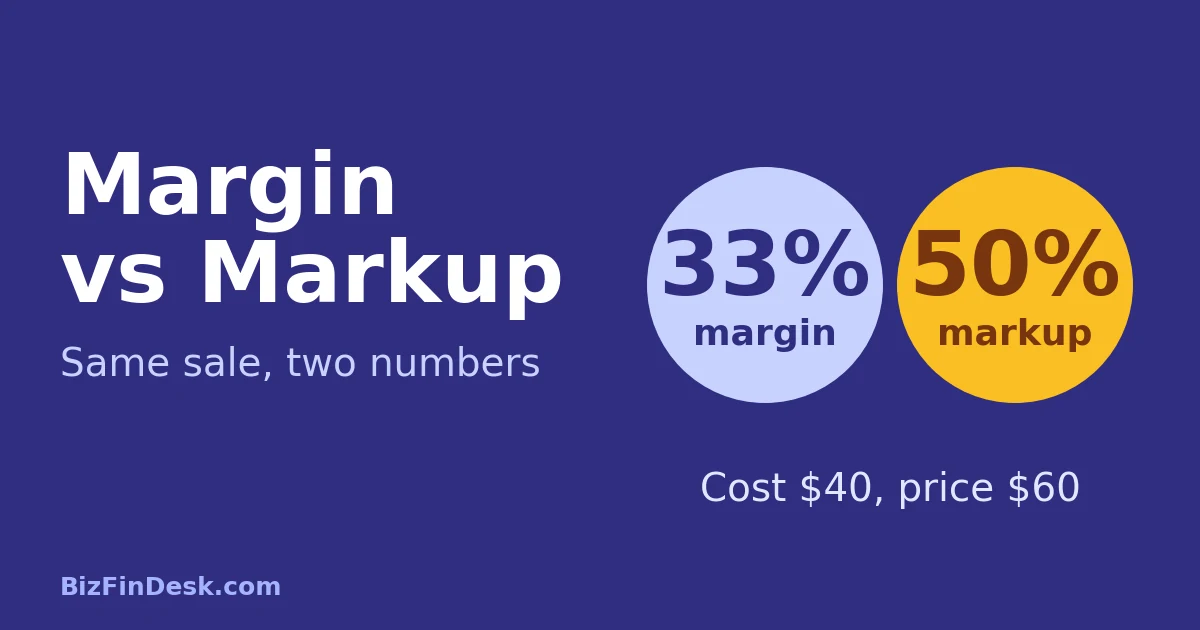
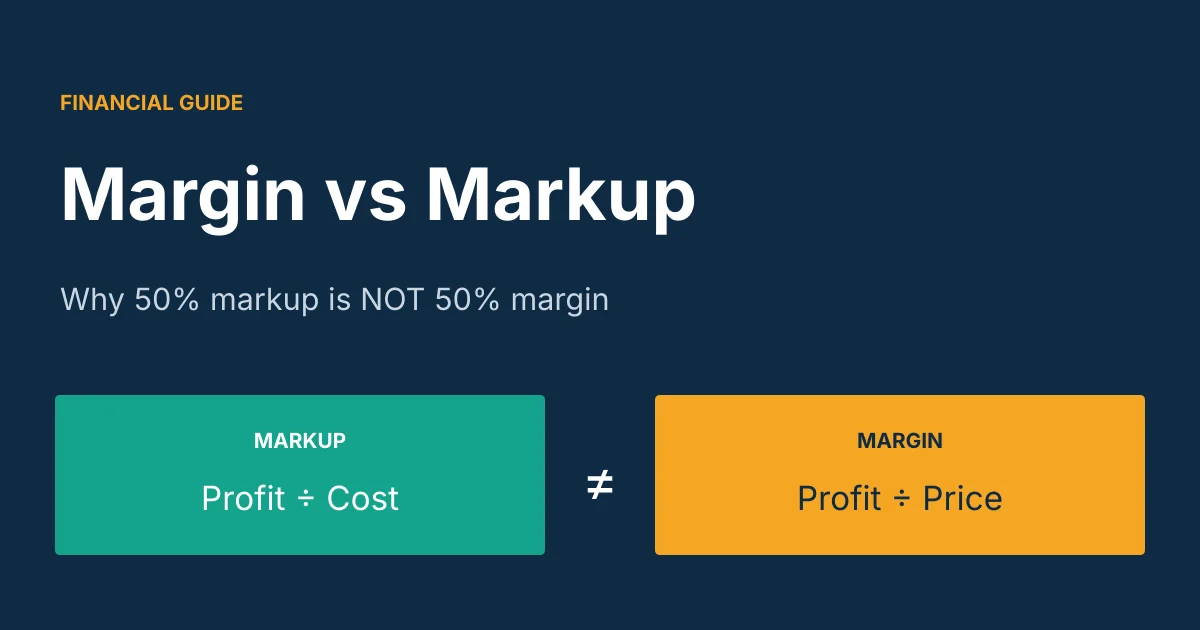
Quick answer: Margin Vs Markup, Markup is profit as a percentage of your cost. Margin is profit as a percentage of your selling price. For the same sale, markup is always the bigger number. A 50% markup is only a 33.3% margin, and a 100% markup is only a 50% margin.

If you have ever priced a product with “a 30% markup” and then wondered why your profit report shows less than 30%, you have met this problem. The two terms sound alike, but mixing them up quietly eats your profit. This guide explains both, gives you the formulas, walks through real examples, and ends with a free conversion chart and calculator.

Margin Vs Markup

Key takeaways

  • Markup = profit ÷ cost. Margin = profit ÷ selling price.
  • The profit amount is identical. Only the percentage changes.
  • Markup % is always higher than margin % (unless cost is zero).
  • Use markup to set prices from your cost. Use margin to judge profitability.
  • Always ask: “Do you mean markup or margin?” before agreeing on a number.

What Is Markup?

Markup is how much you add on top of what an item costs you to arrive at the selling price. It is expressed as a percentage of the cost.

Markup % = (Selling Price − Cost) ÷ Cost × 100

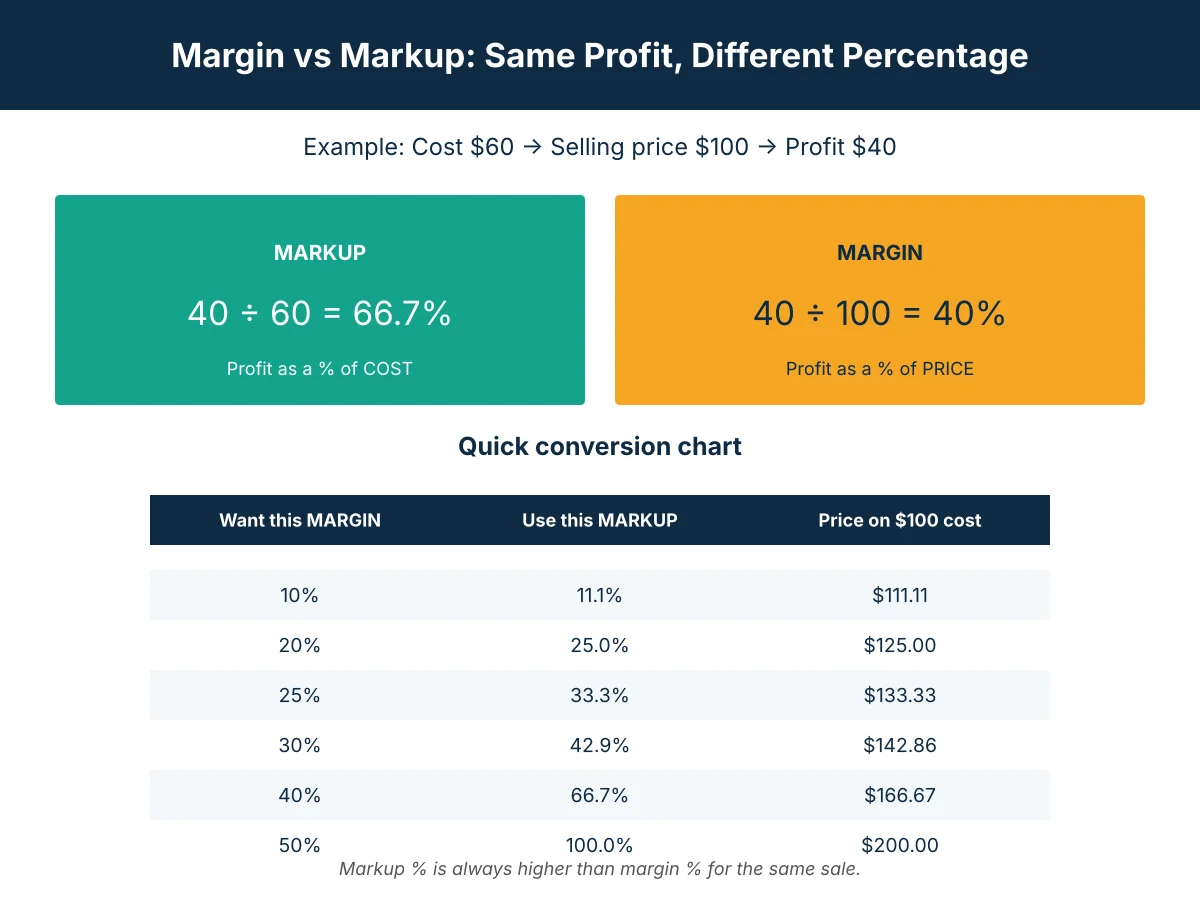
If a product costs you 60 and you sell it for 100, your profit is 40. Your markup is 40 ÷ 60 = 66.7%.

Markup is a pricing tool. It answers the question: “I paid this much, so what should I charge?”

What Is Margin?

Margin (often called gross margin or profit margin) shows how much of each sale is actual profit. It is expressed as a percentage of the selling price.

Margin % = (Selling Price − Cost) ÷ Selling Price × 100

Using the same product: profit is 40, price is 100, so margin is 40 ÷ 100 = 40%.

Margin is a profitability measure. It answers the question: “Out of every 100 I earn, how much do I keep after the cost of the item?” It is the number that shows up on income statements and in conversations with accountants, banks and investors.

Margin (often called gross margin vs profit margin) shows how much of each sale is actual profit. For a second explanation of the same idea, see AccountingTools’ guide to the difference between margin vs markup.

Margin vs Markup: Side-by-Side Comparison

MarkupMargin
Based onCostSelling price
Formula(Price − Cost) ÷ Cost × 100(Price − Cost) ÷ Price × 100
Main useSetting pricesMeasuring profitability
Example (cost 60, price 100)66.7%40%
Can it exceed 100%?YesNo, never
Who uses itSales, buyers, retailersFinance, owners, investors

Think of a cup that is half full or half empty. The water is the same. You are just describing it from a different starting point.

Why the Percentages Are Different

The profit (40) is the same in both calculations. The difference is the number you divide by. Cost (60) is smaller than price (100), so dividing by cost gives a bigger percentage.

That is also why you can have a markup above 100% but a margin can never reach 100%. A margin of 100% would mean your cost was zero.

How to Convert Markup to Margin (and Back)

You can convert between the two with simple formulas:

  • Margin = Markup ÷ (1 + Markup)
  • Markup = Margin ÷ (1 − Margin)

Use the decimal form, so 50% is 0.50.

Example: a 50% markup gives 0.50 ÷ 1.50 = 0.333, which is a 33.3% margin.

Example: you want a 40% margin. Markup = 0.40 ÷ 0.60 = 0.667, so you need a 66.7% markup.

Margin to markup conversion chart

Desired marginMarkup neededSelling price if cost is 100
10%11.1%111.11
20%25.0%125.00
25%33.3%133.33
30%42.9%142.86
40%66.7%166.67
50%100.0%200.00

Sanity check: the markup number must always be larger than the margin number. If your conversion gives you a smaller number going from margin to markup, you used the wrong formula.

How to Set a Price From a Target Margin

Most owners think in terms of the profit they want to keep. Here are the two ways to get to a price:

  • From a markup: Price = Cost × (1 + Markup)
  • From a margin: Price = Cost ÷ (1 − Margin)

So if an item costs 1,000 and you want a 30% margin, the price is 1,000 ÷ 0.70 = 1,428.57.

The Costly Mistake: Using Markup When You Mean Margin

Here is how it goes wrong. An owner wants a 30% profit margin. The item costs 1,000. They add 30% on top of cost, so the price is 1,300.

Profit is 300. Margin is 300 ÷ 1,300 = 23.1%, not 30%.

To really earn a 30% margin, the price had to be 1,428.57. That is a gap of 128.57 on every single sale. Across hundreds of sales a month, this is real money quietly lost.

Real-World Examples

Example 1: A product business

A shop buys a jacket for 4,000 and sells it for 6,000.

  • Profit = 2,000
  • Markup = 2,000 ÷ 4,000 = 50%
  • Margin = 2,000 ÷ 6,000 = 33.3%

Example 2: A service business

A design studio spends 20,000 in contractor and software costs to deliver a project, and bills the client 32,000.

  • Profit = 12,000
  • Markup = 12,000 ÷ 20,000 = 60%
  • Margin = 12,000 ÷ 32,000 = 37.5%

If the studio’s owner says “we run a 60% margin,” they are using the wrong word, and their bank or accountant will read it very differently.

Example 3: Keystone pricing

Many retailers double the cost of an item (a rule called keystone pricing). That is a 100% markup, which equals a 50% margin.

The Discount Trap

Margins shrink faster than most people expect when you discount. If your price is 100, cost is 60 and margin is 40%, a 10% discount (price 90) leaves profit of 30. Your margin drops to 30 ÷ 90 = 33.3%, and your profit per sale is down 25%.

Before running a promotion, work out your margin at the discounted price. If volume does not rise enough to cover the lost profit, the promotion loses money.

When to Use Markup and When to Use Margin

Use markup when:

  • You are setting a price from a supplier cost
  • You use a standard markup across a product range
  • You are building a quote or price list

Use margin when:

  • You are reporting profitability to owners, a bank or investors
  • You are comparing products, services or channels
  • You are setting profit targets and budgets

In practice you use both. Decide the margin you need, convert it to a markup, price with that markup, and your reports will then show the margin you wanted.

Common Mistakes to Avoid

  1. Using the words interchangeably. Always say which one you mean, especially in contracts and team discussions.
  2. Applying your target margin as a markup. This underprices every sale (see the 30% example above).
  3. Ignoring overhead. Gross margin only covers the cost of the item. Rent, salaries, marketing and tax still have to be paid from it. Check your break-even point as well.
  4. Forgetting discounts, fees and returns. Payment fees, shipping and refunds all reduce your real margin.
  5. Mixing currencies. If you buy in one currency and sell in another, convert both to the same currency before calculating, or exchange rate swings will distort your margin.

Try It Yourself: Free Markup and Margin Calculator

Skip the manual maths. Our free Markup vs Margin Calculator works in any currency. Enter your cost and selling price to see profit, markup and margin at once, or enter your target margin to get the price you should charge.

Other tools that pair well with this guide:

Frequently Asked Questions

What is the main difference between margin vs markup?

Markup is profit divided by cost. Margin is profit divided by selling price. The profit in currency is the same, but the percentages differ.

Is markup always higher than margin?

Yes. Because cost is always smaller than the selling price, dividing profit by cost always gives a bigger percentage than dividing by price.

What is a 50% markup in margin?

A 50% markup equals a 33.3% margin. A 100% markup equals a 50% margin.

How do I convert markup to margin?

Margin = Markup ÷ (1 + Markup). For a 25% markup: 0.25 ÷ 1.25 = 20% margin.

How do I convert margin to markup?

Markup = Margin ÷ (1 − Margin). For a 20% margin: 0.20 ÷ 0.80 = 25% markup.

Can margin be higher than 100%?

No. Margin is a share of the selling price, so it can approach but never reach 100%. Markup can go above 100%.

Which should I use to set prices?

Most businesses use markup to calculate a price from cost, but decide the target using margin. Convert the margin you need into a markup, then price with it.

Is gross margin the same as profit margin?

Not exactly. Gross margin only subtracts the direct cost of the goods or service. Net profit margin subtracts all expenses, including overhead, interest and tax.

Final Thoughts

Margin and markup describe the same profit from two different angles. Markup helps you set the price. Margin tells you how healthy the business is. Know which one you are using, convert between them carefully, and always check your margin after discounts. Do that, and your prices will deliver the profit you planned.

Disclaimer: This guide is for general education and is not financial or accounting advice. Talk to a qualified accountant about your specific situation.

Share with